.

Tuesday, September 20, 2011

Chevron Stripes & Stitching


One new trend that I'm seeing everywhere is chevron stripes. Today I have a really simple tutorial on how to create this look on your own projects and layouts. The "Study Hall" kit was perfect for utilizing this type of technique and my subject is far from "back to school" but all about being a "scholar." :) Little Miss Lily loves to make her "thinking" face all the time and says "Hmmm...." while bringing her finger to her lips. Another little quirk captured! :) Here's a peek at what I created with this technique. 


The first thing I did was select a variety of patterned papers and then traced and cut out diamond shapes from them. (You could also use a die-cut machine for this as well.) 


After inking all my diamonds, I laid them out so I could see what it would all look like before doing any adhering and stitching. 


Finally, I threaded up a needle with embroidery floss and did a very rough, running stitch of white and red floss on the top and bottom of the chevron stripe. The key here is imperfection! I also machine stitched along the patterned paper on the inside of the stripe, which you can see more of in first photo. 


And, here's my finished layout! 


A close-up of the title (pretty sure I'm in love with the Fancy Pants chalkboard stickers)...


My journaling on an Elle's Studio pennant. 


And that's it! Give this one a try...it was really simple! :)

Jill

Monday, September 12, 2011

Split Splat!

Hiya! I hope you all had a great weekend!


I've got a tutorial for you today about the different mediums and techniques you can use to make splatters on your layouts. Now, this is obviously not a science - do whatever works for you - but these are some of the things I do to get that effect.


Untitled from BrittnyKvilhaug on Vimeo.


Here's how that final technique turned out. LOVE IT.


So now go find all the liquids in your studio and play around to see what cool things you come up with.
Happy Scrappin'!!
xoxo
Britt

Saturday, August 20, 2011

Mixed Media Flower Canvas- a mini tutorial from Virginia!

Hello lovely friends! I hope you've had a great week and are looking forward to a fun weekend!

I know that we've had a lot of requests (coughcoughShannoncoughcough) on the message board for mixed media tips; Britt has shared several great ones here on the blog, and I wanted to throw in a few too!

I started off with a background I'd already created and cut a simple flower, with circles cut from the Salt Water Taffy kit and some text paper.
Tip #1: to make it look less like paper just glued to a canvas, add some paint on TOP of the patterned paper. You can see that the big red outer circle is completely painted over, and I've added some streaks of red around the outside of the whole flower. I also began adding a few rub ons (from the Salt Water Taffy kit) around the edge.
Here you can see where I began adding paint to the stem and leaves. This is all just acrylic craft paint.
Tip #2: paint with your mists! I unscrewed the lid of my mists and dipped my paintbrush inside, and began painting on the stem and leaves with a green mist.
Tip #3: let your rub ons do the work! I bought some great Hambly rub ons from Noel a while back, and began adding them onto the outside of the flower. I have a small stash of rub ons now saved just for canvasses!


Tip #4: Outline with pen & marker! This step is crucial to making everything really stand out and look defined. I grabbed this marker a while back from my LSS. It's a big thick marker, and it's made for this kind of art.
It dries quickly and is permanent, so I do small sections at a time. Just outline a little and then rub with your finger to get a smudgy affect.
And here's my final piece!

(Final tip- don't forget to finish your canvas edges! I did mine with the washi tape in the Salt Water Taffy kit!)
I hope you guys start trying out mixed media! Make sure to share your results with us! :)

Tuesday, May 17, 2011

Design tips: Just some things for you to think about!

There is an art to scrapbooking!
Scrapbooking is based on some of the same basic design rules as
painting/drawing, graphic design,
interior decorating, photography, landscaping, etc!
So I've got some things for you to think about that may help your scrapbooking design.

There is a basic rule called the
"Rule of Odds".
The gist of this rule is that things arranged in odd numbers
are more pleasing to the eye.
When making a layout, card, or project think about using things like pictures, embellishments, and papers in groups of 3, 5, 7, and so on!

There is a similar rule called the
"Rule of 3's".
The basic gist of this rule is that things arranged in 3s are more appealing, memorable, and pleasing to the eye than other numbers of objects.

OK so let's look at some examples of these rules in action...
Check out this layout by Virginia.
She's got 3 pictures, a cluster of 3 pumpkins at the top, and a cluster of 5 pumpkins at the bottom.
She used corrugated cardboard on 3 different places on this page.
(can you find them?)
She's even got 3 different areas where she has clustered embellies and/or journaling: a
bove the pictures, to the right of the pics, and then below the pics.
Way to abide by the rules Virginia!
:)
*****
There are some good "odds" in this layout by Kim.
She used 5 pictures.
There are 7 flags in the banner she created.
She even did her journaling on a cluster of 3 label stickers above the pictures on the left side of the page.
*****
Look at this one that I made for the "Stampy McStamperson" challenge.
I've got 3 stamped images, 3 buttons, and 3 asterick thingys from the pack of American Crafts Thickers to embellish around the picture.
I used the striped paper (which I adore) in 5 different places around the edges of the page.
*****
Look at this one that Noel made using the Bedford Falls kit.
She has some less obvious "odds" going on here!
She used 3 main colors: blue, red, and green.
She has text distributed in 3 places: the title with the tiny alpha stickers, the journaling block, and then the "Merry Christmas" tag on the left corner of the picture.
There are 3 stars under the "star" in the title of the layout.
She used 3 different strips of patterned paper underneath the pictures.
See!!
There are odds everywhere!
:)
*****
OK now check out this one that Leah just posted with the Mary Ellen kit.
This one is interesting!
She has her layout divided up into 3 sections by using different patterned papers.
She has created a distinct left side, middle section, and left side.
She used 3 buttons.
It looks like she has used 3 prominent colors: green, blue, and red.
She has 3 clusters of embellies: bottom left corner of the page, bottom right corner of picture, and then at the top right corner of the picture.
Leah has all kinds of 3's going on here!
OK I hope these tips/rules help you the next time you start to put together a project!
Let me know if you have any questions!
:)
gretchen

Wednesday, May 11, 2011

How to Make Your Layouts Look GREAT for Posting Online!


I want to start this off by saying I am by NO means an expert at taking pictures, and my pictures don't always turn out perfect, but I know a few tricks that can help you make sure that when you are posting picture online, you're able to represent your layout well!

1. Start off by taking your pictures outside, with NO flash (if possible). Most cameras have a setting to do this on the dial (one of those circles with slashes over a lightening bolt). You want to have natural shadows and coloring on your layout, and this is the best way to get it.

2. Be in INDIRECT sunlight. You don't want the sun to actually be hitting your page, so be on a porch, under the shade of a tree, or some other area that is outdoors, but not in direct sunlight.

3. Stand directly over your layout. You may have to get up on a chair to do this! Take a bunch of shots, not just one. You want to try to make sure that the layout is square in the frame... not a parallelogram!
Get in different angles and get close up shots (zoom in!). We scrapbookers love to see the little details! To do this, use your "macro" setting on your camera (usually looks like a little flower or tulip).
Sometimes I lean it up against something and stand away to get a good shot of it.
If you take a picture of it in your yard, under a tree, make sure that this (below) doesn't happen! You don't want splotchy shadow! Try to get to where it's a solid shadow.

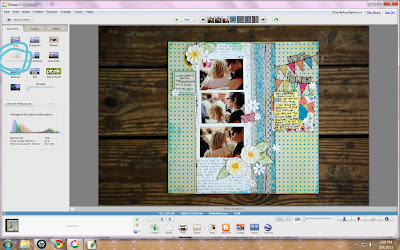
4. Once you've taken your picture, then you want to do a little enhancing to make it truly shine! I'm using Picasa in this tutorial, because it's a free program available to anyone.

Import the photo. Here's my shot from the front porch.
To adjust the colors, brightness, etc., I love to use the handy "I'm Feeling Lucky" button. It usually fixes everything just right!
Here's a shot from in the yard. You can use the "Straighten" tool to get it a perfect square. Just look at the gridlines on the screen and line up one edge of the layout to them, using the adjuster on the bottom.
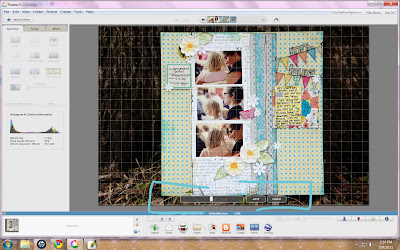
Then crop, using the crop tool (manual). You'll just grab the edges and pull them in as close to the edges as possible.

Don't forget to enhance your close up shots, too. If "I'm Feeling Lucky" doesn't work for your pictures, you can also click on "Tuning" and adjust the brightness, etc.

Here's my final results from my editing! (This was created for Lily Bee Designs! Go check out our blog today for some fun prizes!)


Please leave me any questions if you have them, or tips we'd love to have!

Wednesday, March 30, 2011

Behind the scenes....

Hi Everyone!! So a few weeks ago I asked on the forums what you all would like to see in the future blog posts, and the idea of a behind the scenes inspiration post was suggested. :D I really liked this idea, though I had never done it before and was a little nervous to do so. Well with the last LO I did, I gave it a try! :D

Now it is not an exact from beginning to end in pictures (that is a little difficult for me to do because I change my mind so much when designing and also because all my crafting happens at night which makes for really bad pics!), but it gives you a good idea.

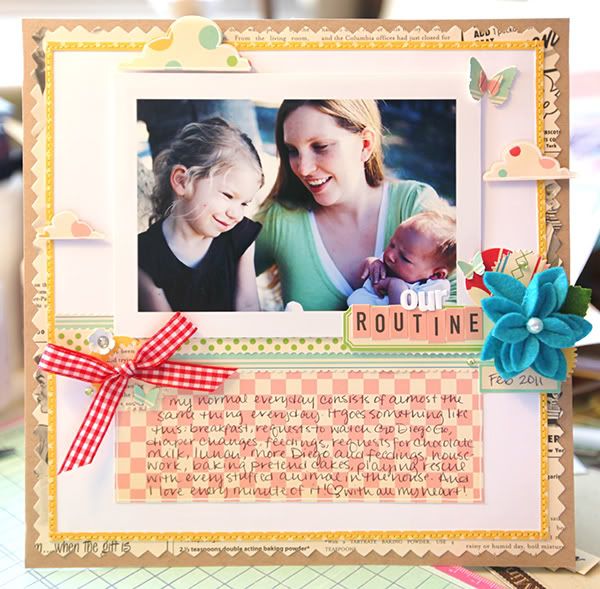
Here is the layout: I made it for the current challenge


I am going to begin by sharing with you all the inspirations I picked when prepping for this layout. I feed very much off of other sources for inspiration, and right now there are a couple scrappers out there who's styles I am really liking! So below I have three layouts, by three different scrappers, and I used these three layouts in different ways to achieve the look I wanted.


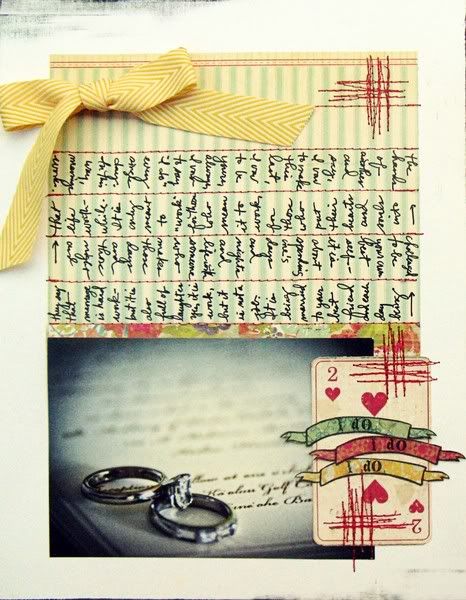
First up is 'I Do' by Jill Sprott-found in this blog post. I LOVE this layout! :D The simplicity, and the journaling, and the design is just gorgeous. I really wanted to incorporate this simple design in my LO, and you will notice that it is kind of there. Just slightly reversed. I have the bow, the section of patterned paper for journaling that is opposite my picture, and even though I have more embellishing on my layout than Jill has on her's, I still kept things really simple and minimal.


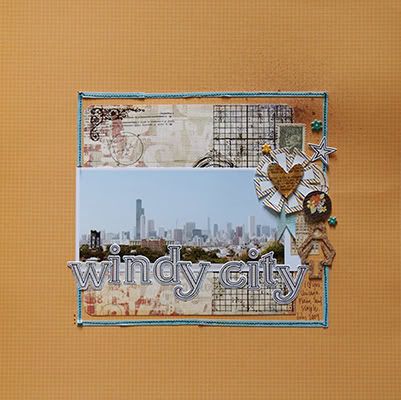
Next up is Jen Jockish. She has been a fav of mine for a very long time. I just can't get enough of her style! She was just recently the Guest Designer over at October Afternoon, and she used the Modern Homemaker line (featured in the Noel Mignon Delightfully Domestic kit) for some of her guest work. I used these pieces as color balance inspiration. I tried to mimic how she used all the papers together, the balance of papers and colors is fantastic. Her layouts look light yet graphic, and very pleasing to the eye.


And last up is a layout by our own Stephanie Wheeler! When I first saw this layout I was amazed! :D Love it! My favorite thing about it is the stitched border. If you look at my layouts for the last year or so, you will see that I use this idea a lot! It not only frames your layout and adds great texture, but can give your layout a very subtle color pop depending on what paper you use! As I said I love this detail, and use it quite often. :D


So now I will begin to explain the beginning process. So my layout is actually sized about 8 1/2 x 8 1/2 inches. I like to make smaller layouts a lot. :D I chose my fav paper (Floursack) for the journaling below my picture, and decided I would go with Party Line as my accent border. I just wanted a little pop of yellow, not a whole ton of it. To create this border I cut two strips of paper, each a 1/2 inch thick. I then cut these in half length wise (just eyeballing it) so that they were each 1/4 inch thick. (I don't own a paper trimmer or a cutting mat that does 1/4 inch marks so if you happen to have those things your process will be a little different than mine). I adhered these strips with just a teeny dot of glue on each end so that they will stay in place while I sew through them. Then I chose the other side of Party Line for my background shaped paper cause I wanted some of the text, but just like the yellow not a whole ton of it. Then I used some kraft paper as my final background to balance it. I went with white cardstock as my main background because I realy wanted my layout to remain light and bright. So here is what it looks like when I have adhered everything background wise. I have my photo raised on pop dots (actually it is the negative of the pop dots as it gives a more solid ground for my photo to sit on).


Photobucket


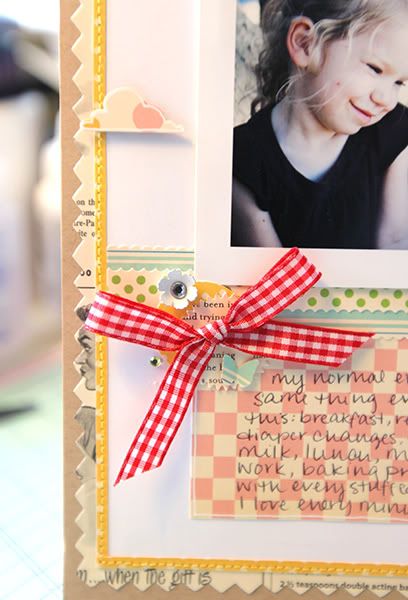
Once all the glue has dried completely then I ran it through my sewing machine. This is fairly straight forward and simple, but you just have to go slow to make sure that you stay on the little strip of paper. I used a coordinating thread to maintain my yellow color pop. :D Here is a pic of what the stitching looks like.


Photobucket


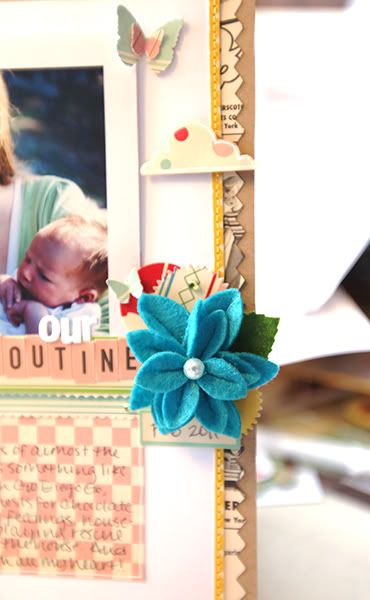
After that, everything was done at night so I have no more pics until the finished product. :P But the rest is pretty easy. I used a couple pieces of paper as strips across the middle of my layout, both for balance and some more color. I cut some clouds out of the Snickerdoodles paper and used my white gel pen to outline them. I knew I wanted to use the bright blue Maya Road flower because I had some of that same color in the background of my photo and thought they would work well together. And I definitely wanted to use the red My Mind's Eye ribbon because I needed the red color pop in there and the ribbon would give my LO some depth and texture. I used a few punched circles of paper to reaffirm the color scheme and patterns, and some of the label stickers to put my title and date on. :D A couple rhinestones, butterflies, and a little white flower and it is done!! :D As I said, fairly straight forward. :P This probably wasn't the most exciting layout for me to do a behind the scenes with but it was a start for me! I will attempt another real soon on a much more detailed and layered layout!


Hope you enjoyed my tutorial!! Thanks for making it all the way through!


Take Care! ~Amy